Forum rules
When asking for technical support:
- Search for posts on the same topic before posting a new question.
- Give clear, specific information in the title of your post.
- Include as many details as you can, MOST POSTS WILL GET ONLY ONE OR TWO ANSWERS.
- Post a follow up with a "Thank you" or "This worked!"
- When you learn something, use that knowledge to HELP ANOTHER USER LATER.
Before posting, please read https://www.cgsecurity.org/testdisk.pdf
Hello. I had to create a new boot partition using Diskpart and another app. I forgot I had an external HD attached when assigning a letter so I can open it up. Somehow I erased the external drive. There is a lot of video footage among other file types.
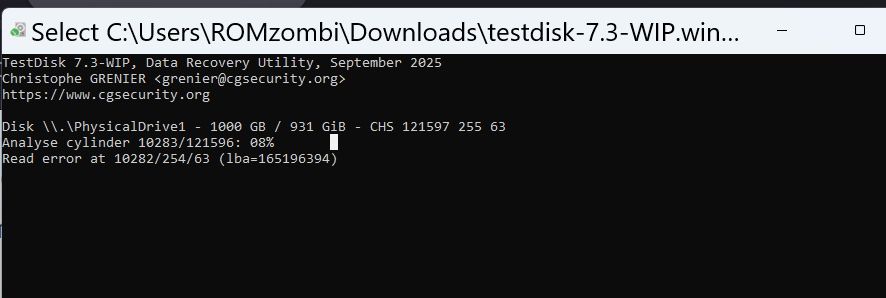
After a few days, it's at only .08% and now it's stuck. Do I need to start over or is there a way to resume the scan or is there too many read errors and I need to use that other software that can fix the issues?
You need to rescue the content of your external disk using a specialized program like ddrescue (as described in the TestDisk manual).
Using any rescue software on your assumably defective disk might diminish your chances of recovery.
Hello and thanks. Why is it considered defective? In Hard Disk Sentinel app it shows as 100% healthy. I restarted Testdisk and it's now at 55%. At the rate it's at it should take 33 hours to complete. Should I stop this and run that DDrescue instead?
why is this showing EFI system partition when this external disk is just storage? edit - I think because I accidentally used the drive letter that wrote boot instructions to this disk and deleting everything.
Oh great. I accidentally formatted the disk i'm running testdisk on. Now I have a Read Error At below the Analyze Cylinder but they are still counting.