Hi and happy new year to everyone!
Some days ago I tried to recover a USB drive, I unintentionally formatted, with TestDisk. It worked as usual, but the partition was formatted as exFAT and now it's being recognized as FAT32.
I tried to change the format type it's being read in Advanced > Type, but I can't seem to find exFAT inside the List of partition type.
It might be there, but my experience is very close to zero so, can anyone help me on this?
exFAT partition partially recovered
Forum rules
When asking for technical support:
- Search for posts on the same topic before posting a new question.
- Give clear, specific information in the title of your post.
- Include as many details as you can, MOST POSTS WILL GET ONLY ONE OR TWO ANSWERS.
- Post a follow up with a "Thank you" or "This worked!"
- When you learn something, use that knowledge to HELP ANOTHER USER LATER.
Before posting, please read https://www.cgsecurity.org/testdisk.pdf
When asking for technical support:
- Search for posts on the same topic before posting a new question.
- Give clear, specific information in the title of your post.
- Include as many details as you can, MOST POSTS WILL GET ONLY ONE OR TWO ANSWERS.
- Post a follow up with a "Thank you" or "This worked!"
- When you learn something, use that knowledge to HELP ANOTHER USER LATER.
Before posting, please read https://www.cgsecurity.org/testdisk.pdf
-
recuperation
- Posts: 3179
- Joined: 04 Jan 2019, 09:48
- Location: Hannover, Deutschland (Germany, Allemagne)
Re: exFAT partition partially recovered
You don't make a cat out of a mouse by putting a sticker labeled "cat" on it.
I doubt that TestDisk could help here.
You can run PhotoRec instead to recover files.
Before running PhotoRec though, try out other regular recovery software that is scanning for the remains of your EXFAT file system. That might provide you with names and folders.
I assume that the FAT within the EXFAT file system was overwritten. If your file system was fragmented, that will reduce the chance of recovery.
But if you want to make sure that you don't loose anything by running TestDisk you can run the quick and the deep search, select each partition found and try to list the files inside ("p"-key):
https://www.cgsecurity.org/wiki/TestDisk_Step_By_Step
I doubt that TestDisk could help here.
You can run PhotoRec instead to recover files.
Before running PhotoRec though, try out other regular recovery software that is scanning for the remains of your EXFAT file system. That might provide you with names and folders.
I assume that the FAT within the EXFAT file system was overwritten. If your file system was fragmented, that will reduce the chance of recovery.
But if you want to make sure that you don't loose anything by running TestDisk you can run the quick and the deep search, select each partition found and try to list the files inside ("p"-key):
https://www.cgsecurity.org/wiki/TestDisk_Step_By_Step
-
FemboyMiles
- Posts: 2
- Joined: 04 Jan 2026, 15:09
Re: exFAT partition partially recovered
I think the partition wasn't overwritten. When I first tried to recover the formatted partition, with the Deeper Search option, I found both the new and the old partition. I restored the old one and, as I said, yeah it now recognizes it as FAT32. But if I look the space used within the partition, it matches the lost partition disk space, and when I try to mount the drive, I can see some wrong files, which I think they might be part of the exFAT headers.
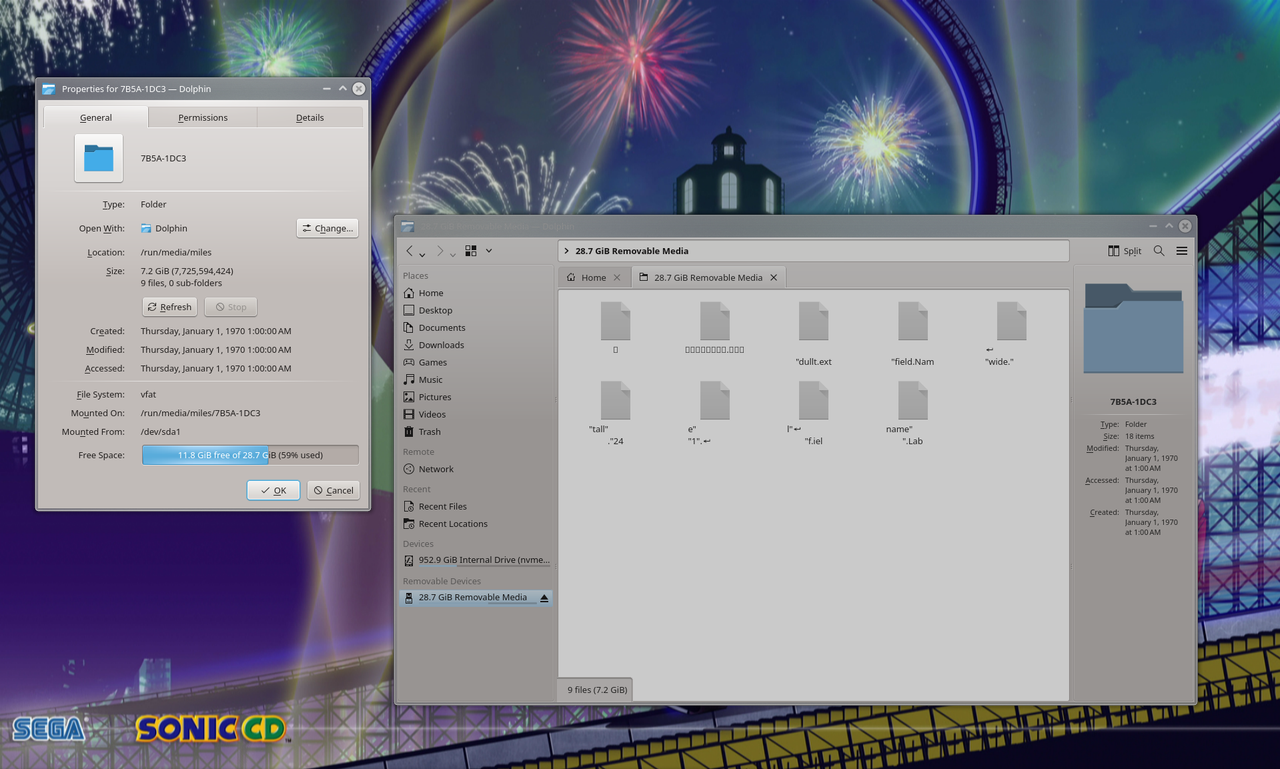
By the way, I previously said FAT32, since it's what every other disk tool says it is. It's the first time I open properties with dolphin and see "vfat".
And sorry if I'm extending something that goes nowhere. I'm kinda clueless, but I'm trying my best to easily recover my files.
By the way, I previously said FAT32, since it's what every other disk tool says it is. It's the first time I open properties with dolphin and see "vfat".
And sorry if I'm extending something that goes nowhere. I'm kinda clueless, but I'm trying my best to easily recover my files.
-
recuperation
- Posts: 3179
- Joined: 04 Jan 2019, 09:48
- Location: Hannover, Deutschland (Germany, Allemagne)
Re: exFAT partition partially recovered
FAT16, FAT32, EXFAT are names of file systems of the "FAT family".
VFAT though, is a name for a certain feature within that family.
VFAT:
https://en.wikipedia.org/wiki/File_Allocation_Table
Describing a file system as '"VFAT" is not specific. Your "dolphin" should primarily mentions the specific member file system listet above.
VFAT though, is a name for a certain feature within that family.
VFAT:
https://en.wikipedia.org/wiki/File_Allocation_Table
Describing a file system as '"VFAT" is not specific. Your "dolphin" should primarily mentions the specific member file system listet above.