Page 1 of 1
Diskpart o0ps
Posted: 07 Jul 2026, 08:09
by ROMzombi
Hello. I had to create a new boot partition using Diskpart and another app. I forgot I had an external HD attached when assigning a letter so I can open it up. Somehow I erased the external drive. There is a lot of video footage among other file types.
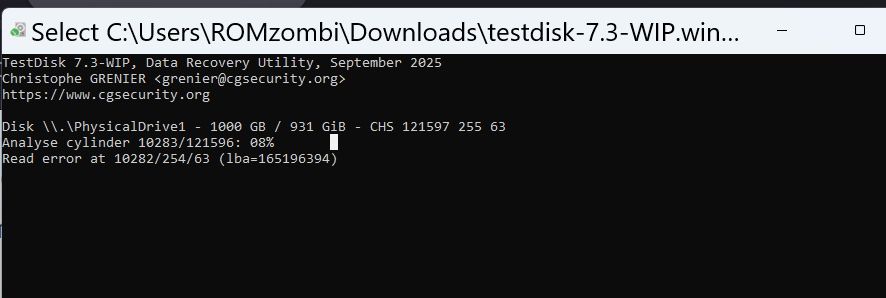
After a few days, it's at only .08% and now it's stuck. Do I need to start over or is there a way to resume the scan or is there too many read errors and I need to use that other software that can fix the issues?
Re: Diskpart o0ps
Posted: 08 Jul 2026, 17:38
by recuperation
You need to rescue the content of your external disk using a specialized program like ddrescue (as described in the TestDisk manual).
Using any rescue software on your assumably defective disk might diminish your chances of recovery.
Re: Diskpart o0ps
Posted: 08 Jul 2026, 19:35
by ROMzombi
Hello and thanks. Why is it considered defective? In Hard Disk Sentinel app it shows as 100% healthy. I restarted Testdisk and it's now at 55%. At the rate it's at it should take 33 hours to complete. Should I stop this and run that DDrescue instead?
why is this showing EFI system partition when this external disk is just storage? edit - I think because I accidentally used the drive letter that wrote boot instructions to this disk and deleting everything.
Re: Diskpart o0ps
Posted: 09 Jul 2026, 06:04
by ROMzombi
Oh great. I accidentally formatted the disk i'm running testdisk on. Now I have a Read Error At below the Analyze Cylinder but they are still counting.